Inventory Detail
Report Parameters
|
Field |
Description |
|---|---|
|
Report Name |
The name of the report. |
|
Category |
A list of all available categories for report selection. |
|
Sub Category 1 |
Select the desired subcategory 1 from the drop-down list. |
|
Sub Category 2 |
Select the desired subcategory 2 from the drop-down list. |
|
Sub Category 3 |
Select the desired subcategory 3 from the drop-down list. |
|
Sub Category 4 |
Select the desired subcategory 4 from the drop-down list. |
|
Sub Category 5 |
Select the desired subcategory 5 from the drop-down list. |
|
Use Last Cost Method |
When enabled, the last cost method is used to generate the inventory detail report. |
|
Disposable Items Only |
When enabled, the report includes only disposable items. |
|
All Active Items |
When enabled, the report includes all the active items. |
|
Suppress Zero Qty Items |
When enabled, suppresses zero quantity items in the report. |
|
Page Break |
When enabled, page breaks are added in the inventory detail report. |
Sample Report
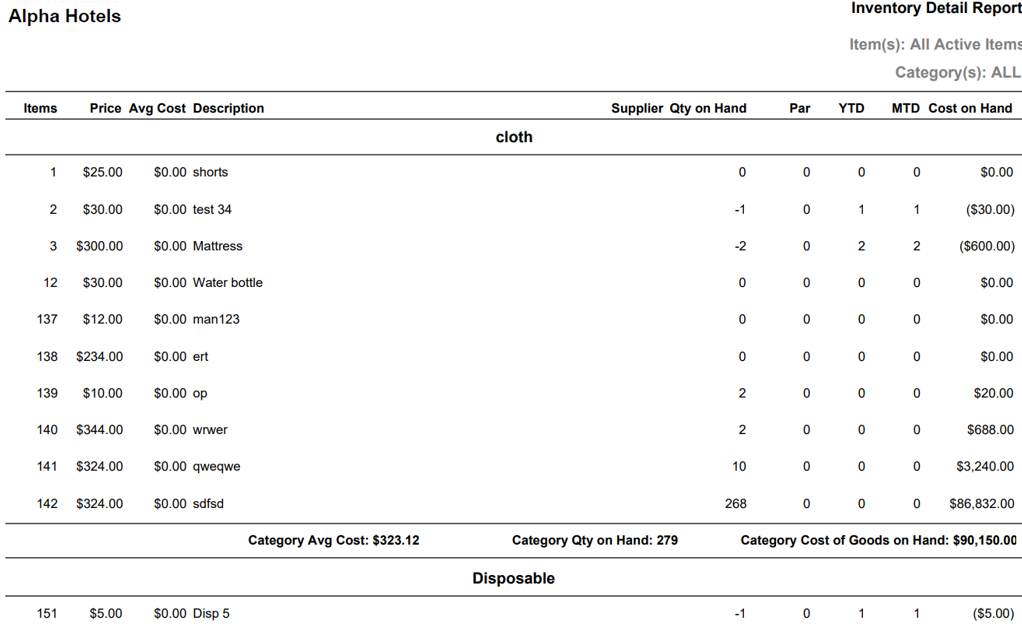
Report Fields
|
Field |
Description |
|---|---|
|
Items |
Category number associated to the inventoried merchandise. |
|
Price |
The price of the retail item. |
|
Avg Cost |
The average cost of the retail item. |
|
Description |
The description of the retail item. |
|
Supplier |
The name of the supplier. |
|
Qty on Hand |
The number of items in hand. |
|
Par |
The minimum number of items needed to meet the demands at the property. |
|
YTD |
The year-to-date transactions to be made. |
|
MTD |
The month to date transactions to be made. |
|
Cost on Hand |
The amount of money in hand. |